Ondes PRO MCP server
Ondes PRO MCP server security
Plugging an AI into the system that holds your orders, invoices and customers is a security decision before it is a convenience. This page explains plainly how the Ondes PRO MCP server authenticates an assistant (OAuth 2.1 or an API key), what a connection is allowed to do, how to cut it off, and what the AI can never get.
Is MCP secure? The context, without the hype
The protocol grew fast, and some early implementations had serious flaws. In July 2025 a critical vulnerability was disclosed in mcp-remote, a small tool that bridges a remote server to a local client (CVE-2025-6514): a malicious server could get commands executed on the user’s machine during authorisation. On 20 May 2026 the NSA published an advisory on MCP security, pointing in particular to weak access controls, token lifecycle gaps and limited audit logging.
Neither means the protocol is unsafe by nature. Both are reminders that MCP security is decided in three places: how the client is authorised, what the server agrees to execute, and what the organisation can control afterwards. That is the order we follow here.
How the assistant authenticates: OAuth 2.1 with PKCE
OAuth 2.1 is the default path. Your Ondes PRO workspace is both the authorisation server and the resource server: the identity checked is a user of your instance, against your database, with no third party in the loop.
- PKCE with S256 is mandatory and the
plainmethod is rejected: it would send the proof down the same channel as the authorisation code, proving nothing. - No client secret. MCP clients are apps installed on a workstation; a secret stored there would be readable by anyone with the machine. PKCE is what proves the client redeeming the code is the one that asked for it.
- Exact redirect URI matching, with only a loopback port allowed to vary (as RFC 8252 permits): plain prefix matching would let a look-alike domain through.
- No error is sent back to an unverified client: until the client and redirect URI pair checks out, the refusal is shown inside your workspace, never as a redirect.
- A consent screen that spells it out: it states what the connection will be able to do and highlights the callback host, rather than whatever name the app gave itself at dynamic registration.
- One-hour access tokens, signed, refreshed by the client for as long as the connection lives.
- Audience check (
resource, RFC 8707): a token issued for one workspace is worthless on any other Ondes PRO workspace.
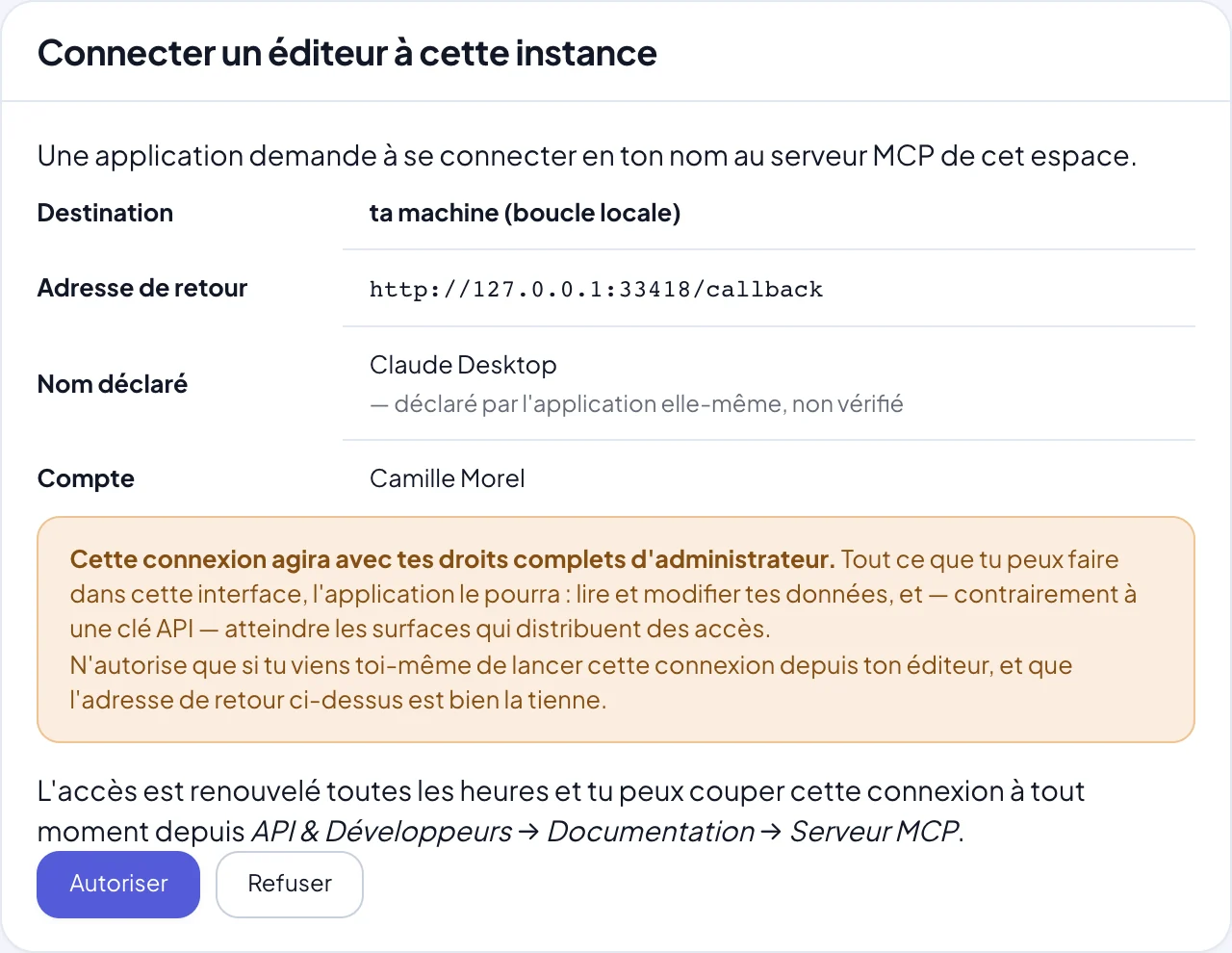
Revoking an MCP connection: instant, one machine at a time
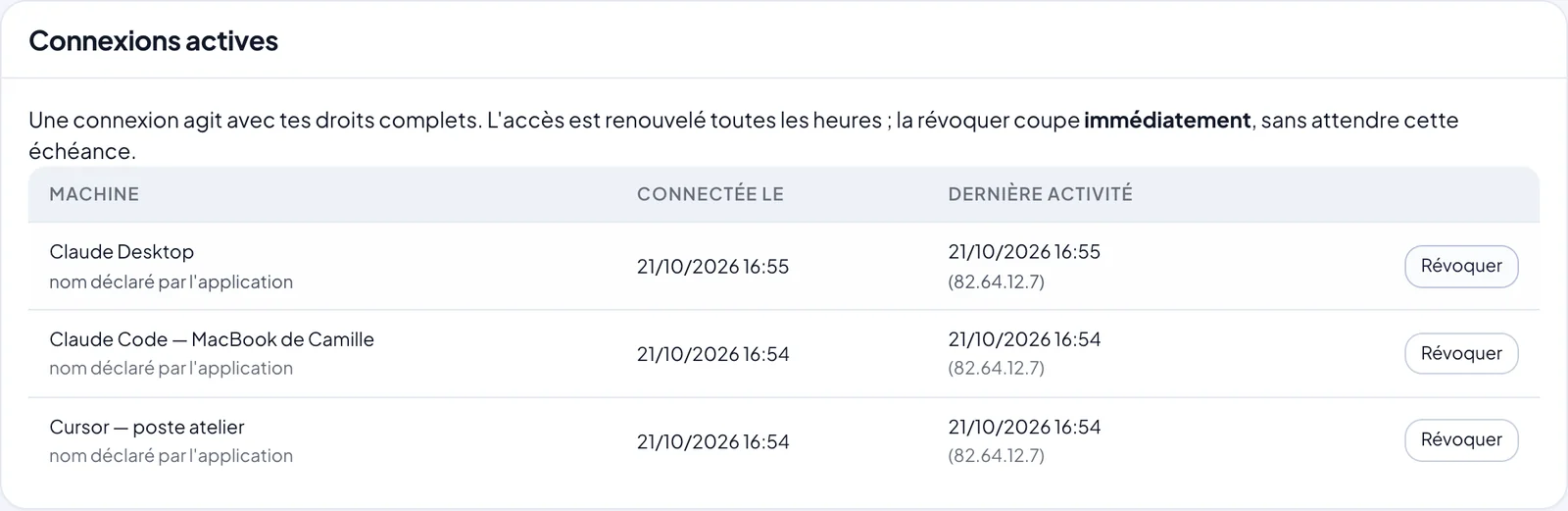
Every connection is listed in the MCP tab of the “API & Developers” area under a name a human understands — “Cursor, on my laptop” — with its creation date, last activity and last IP address. A lost laptop or a departing employee is handled in one click, without touching any other device.
Revocation does not wait for the token to expire. The access token only points to a connection, which is re-checked on every call: once the connection is cut, the token becomes useless on the spot. Refresh tokens are stored as hashes, never in clear text.
Limiting what an AI can reach: scoped API keys
When a full identity is too much — a contractor, a dashboard, an agent that should only read — use an API key instead of OAuth (header Authorization: ApiKey opk_…). Keys are created under API & Developers → API keys and carry module:action scopes, read-only invoicing for instance.
A scope is a ceiling, never a grant: access requires the scope and the holder’s matching permission. A key therefore never outranks the person who created it, and some resources (roles, encrypted messaging) stay closed to keys by design. Each key has its own adjustable per-minute quota and can be suspended without being destroyed. Connecting to the MCP server also requires the “API & Developers” module in your role.
OAuth or API key: which one for which job?
| Criterion | OAuth connection | API key |
|---|---|---|
| Permissions | The person’s full identity | Chosen scopes, capped by the holder |
| Lifetime | One-hour token, refreshed | Until revoked or suspended |
| Revocation | Per machine, instant | Per key, instant |
| Nothing to store client-side | Yes | No: the key is a secret to protect |
| Typical use | A developer or owner on their own machine | Narrow access, automation, third parties |
When the AI is asked to do something risky
The server does not rely on the model being careful. Here an irreversible request is brought back to what the law and the API allow.
Write safeguards built into the MCP server
Letting an AI write does not mean letting it write any old way.
- Test mode by default: when a resource has a test twin (store orders, meetings, email sends, invitations; mailboxes in dry-run),
ondes_appelerwrites there unless the assistant explicitly passesreel: true. - Dry run on any resource:
simuler: truevalidates a request body without saving anything. - Automatic idempotency: a request replayed after a network drop never creates a duplicate.
- Mode always stated: every response says whether it was a test or a real write.
- Plan, then confirm: writes from the built-in assistant (
ondes_assistant) are proposed as a plan and run only once you approve. - Readable refusals: a business-rule refusal comes back as a result the assistant understands and corrects, not as an outage that would tempt it to work around it.
What the AI cannot do, even with your permissions
- Read the content of your end-to-end encrypted Drive: the server decrypts nothing. The assistant sees metadata; content only opens with an application key you approve yourself in your browser. See the Drive over MCP.
- Obtain a secret: the API never returns passwords, tokens or private keys.
- Send from an arbitrary address: mail goes out from your own domain’s mailboxes, not from an invented sender.
- Delete an issued invoice: you issue a credit note, with a reason.
- Discover what it would be refused: tools, table of contents, search and resource sheets are filtered by the user’s scope. The assistant is never shown what would answer 403.
Logging and audit trail for MCP calls
Every call made through ondes_appeler is written to the API request log, tagged “MCP”, with method, path, status and originating connection — including OAuth connections, which have no API key to attach it to. Documentation searches only keep their main term: never a request body.
The log serves audits (“who created this quote, and from which machine?”) as much as product work: a term searched often and never found points to a gap.
Isolation: one instance per customer, one boundary per company
Every Ondes PRO customer runs their own instance, in a dedicated container with a dedicated database, hosted in France. The MCP server lives inside that instance: there is no shared entry point through which a connection could slide into another customer’s data, and the audience check shuts out tokens from other workspaces.
Within a multi-company instance, ondes_appeler takes an espace parameter to target a subsidiary. It is re-checked against the user’s permissions on every call: a subsidiary never sees a sister company’s data, and a user restricted to one company cannot grant themselves the group view. For the rest of the platform, see Ondes PRO security.
Keep reading
- MCP serverPlug the AI assistant of your choice into your whole business, with your permissions and nothing more.Read
- What is MCP?The complete guide to the Model Context Protocol: definition, architecture, comparisons, security and adoption.Read
- REST API v1Around 135 REST resources, scoped keys, an OpenAPI schema and signed webhooks.Read
- MCP clientsWhich AI assistant to plug into your workspace, and where each one sets up the connection.Read
Frequently asked questions
Is MCP secure?
The protocol provides a framework; security depends on the implementation. The Ondes PRO MCP server enforces OAuth 2.1 with PKCE S256, one-hour tokens bound to a single workspace, instant per-machine revocation, test mode by default for writes that support it, and logging of every call.
What can an AI connected through OAuth do?
Exactly what the person who authorised the connection can do, no more and no less. The consent screen says so. For narrower access, use an API key with limited scopes: it never exceeds its holder’s permissions.
How do I cut off an AI assistant’s access?
Open the MCP tab in the “API & Developers” area and revoke the connection, identified by its machine name. The cut is immediate: the current token becomes useless without waiting for its one-hour expiry.
Why is there no OAuth client secret?
MCP clients are apps installed on a workstation: a secret stored there would be readable by anyone with access to the machine, so it would protect nothing. Proof relies on PKCE with S256, and the plain method is rejected.
Can the AI read the files in my Drive?
No. The Ondes PRO Drive is end-to-end encrypted and the server decrypts nothing: an AI connected over MCP sees metadata, not content. Only an application key you approve in your browser can read files, as part of a developer integration.
Where is the data hosted?
In France, in a dedicated instance per customer (its own container and database). The MCP server is part of that instance; what the assistant reads then passes through the vendor of the assistant you chose, under its own terms.
Could an AI accidentally write to my live data?
Resources that have a test twin receive writes in test mode by default; a real write has to be requested explicitly, and every response states the mode used. Any write can also be dry-run without saving anything.
Plug your AI into your business
The MCP server is included in every plan, with no add-on or extra fee.
Read next
- MCP vs REST APIWhat really sets them apart, when to pick which, and why at Ondes PRO they work together.Read
- MCP vs Zapier, Make, n8nA dated, sourced comparison of two different takes on connected AI, and why they complement each other.Read
- Modules available over MCPEleven business modules behind one MCP server: what the assistant can read and do in each.Read
- By industryWhat an AI assistant connected to Ondes PRO actually changes, depending on your line of business.Read
- Step-by-step guidesFour hands-on paths, from an existing website wired to the store to follow-ups described in one sentence.Read
Claude, Claude Code and Claude Desktop are trademarks of Anthropic, PBC; Cursor is a trademark of Anysphere, Inc.; Visual Studio Code and Microsoft are trademarks of the Microsoft group of companies; GitHub and GitHub Copilot are trademarks of GitHub, Inc.; ChatGPT and OpenAI are trademarks of OpenAI; Windsurf is a trademark of Cognition; Zed is a trademark of Zed Industries, Inc.; JetBrains, Cline, Zapier, Make, n8n, Stripe and Model Context Protocol are trademarks of their respective owners. These names are used solely to describe compatibility or to make a comparison. Ondes PRO is not affiliated with, sponsored or endorsed by these companies.