Connect an AI assistant
Connect Ondes PRO to Claude
Claude connects to your Ondes PRO workspace’s MCP server as a custom connector — in the desktop app, on claude.ai, or in the terminal with Claude Code. It takes a minute, with no key to copy: the connection uses OAuth.
Type your workspace name: the configurations on this page adapt. It is remembered in this browser only.
Add Ondes PRO to Claude Desktop or claude.ai
Custom connectors are available on every Claude plan (the free plan allows one). Anthropic still labels them beta, so exact menu names may change.
Find your workspace address
It is your Ondes PRO admin address followed by
/mcp/. Type your subdomain in the field at the top of the page: every configuration adapts.urlhttps://your-workspace.ondes.pro/mcp/Open connectors
In Claude, open Customize, then Connectors, then + Add and Add custom connector. In a Team or Enterprise organisation, an admin adds it once from the organisation settings.
Paste the address and confirm
Name the connector “Ondes PRO” and paste the address. Leave the advanced OAuth settings empty: the server announces itself.
Authorise the connection
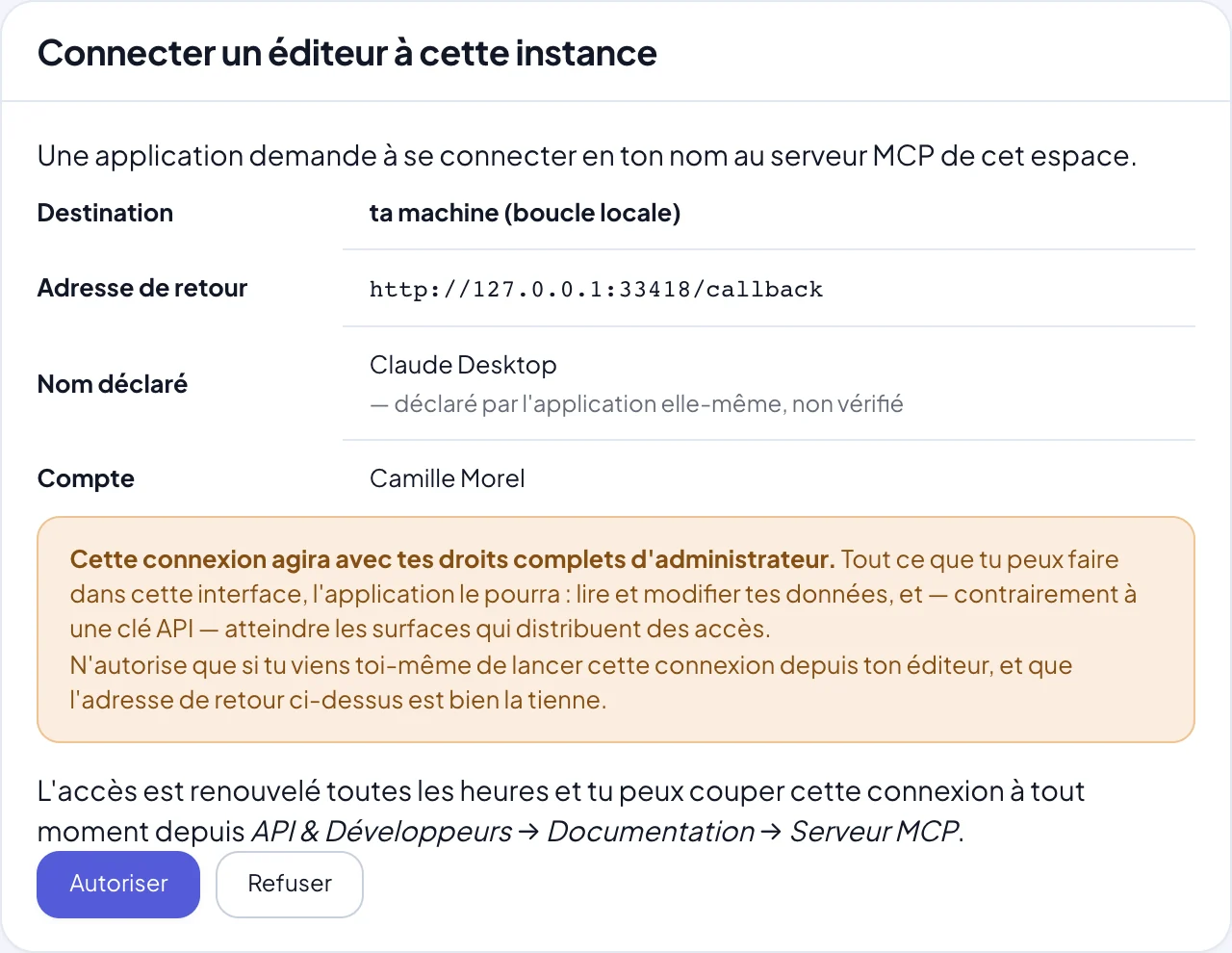
A window from your Ondes PRO workspace opens. Sign in, read the consent screen — it states plainly what the connection will allow — then authorise. Claude then lists the server’s tools.
Ask your first question
Try “Which invoices are overdue?” or “Summarise this week’s store activity”. Claude picks the tools to call on its own.
With Claude Code, in the terminal
For a developer building an integration, Claude Code is the most direct path: it reads your workspace’s documentation while it writes the code. Then type /mcp inside Claude Code and pick “ondes” to sign in.
Where to set it up : One terminal command, then /mcp inside Claude Code to sign in.
OAuth connection (recommended)
No key to copy: a window from your Ondes PRO workspace opens to authorise the connection.
claude mcp add --transport http ondes https://your-workspace.ondes.pro/mcp/API key connection
Create a key in API & Developers → API keys, then replace opk_… with its value.
claude mcp add --transport http ondes https://your-workspace.ondes.pro/mcp/ \
  --header "Authorization: ApiKey opk_…"
Vendor documentation : code.claude.com
OAuth or API key: which one?
OAuth is the default: nothing to copy, nothing to store, and the connection shows up in your workspace under the machine’s name, revocable in one click. It acts with your full permissions.
An API key suits cases where you want to narrow access — say, a read-only invoicing key for a colleague building dashboards. Create it in API & Developers → API keys; it is shown only once. A key never exceeds its holder’s permissions. Both options are detailed on the MCP server security page.
What a conversation looks like
Request ideas
- “Create a card in the Workshop board for Hôtel Ker Aven’s order, due Friday.”
- “How many Arc floor lamps are left in stock, and when should production restart?”
- “Set up a 15% promo code valid until Sunday for the newsletter.”
- “List unread emails in contact@ that mention a quote.”
- “Schedule a video call with Studio Nord on Tuesday at 10am and send the invitation.”
Other assistants
- ChatGPTChatGPT developer mode accepts your workspace as an MCP connector, over OAuth.Read
- CursorOne `.cursor/mcp.json` file, one OAuth sign-in: Cursor’s agent codes against your real workspace.Read
- Visual Studio CodeGitHub Copilot agent mode reads and calls your workspace from `.vscode/mcp.json`.Read
- WindsurfCascade plugs into your workspace through `mcp_config.json` and the `serverUrl` key.Read
Frequently asked questions
Is Claude’s free plan enough?
Yes, to try it: it allows one custom connector. Paid Claude plans accept more and give more usage.
Can Claude change my data without asking?
Claude asks for your approval before using a tool that writes, depending on your permission settings in Claude. On the Ondes PRO side, writes go to test mode when the resource has one, and the built-in assistant proposes its changes as a plan to confirm.
How do I disconnect Claude?
In your workspace, under the MCP tab of API & Developers: every connection is listed per machine with its last activity, and “Revoke” cuts it off immediately. You can also remove the connector in Claude.
Do Claude Code and Claude Desktop share the same connection?
No: each app authorises separately and appears as its own connection in your workspace. That is intentional — you can revoke one without touching the other.
Plug your AI into your business
The MCP server is included in every plan, with no add-on or extra fee.
Read next
Claude, Claude Code and Claude Desktop are trademarks of Anthropic, PBC; Cursor is a trademark of Anysphere, Inc.; Visual Studio Code and Microsoft are trademarks of the Microsoft group of companies; GitHub and GitHub Copilot are trademarks of GitHub, Inc.; ChatGPT and OpenAI are trademarks of OpenAI; Windsurf is a trademark of Cognition; Zed is a trademark of Zed Industries, Inc.; JetBrains, Cline, Zapier, Make, n8n, Stripe and Model Context Protocol are trademarks of their respective owners. These names are used solely to describe compatibility or to make a comparison. Ondes PRO is not affiliated with, sponsored or endorsed by these companies.